Managing cash flow can sometimes feel like walking a tightrope. One wrong step, and you’re scrambling to maintain balance. For professionals, from CFOs to accounts receivable teams, Days Sales Outstanding (DSO) is a crucial metric. It tracks how long it takes your business to collect payments after a sale, offering a clear view of your financial health.
Let’s explore how an Excel template can simplify the calculation of DSO, helping you gain insights and improve your receivables management.
What is DSO, and Why Does It Matter?
DSO measures the average number of days it takes your customers to pay their invoices. Think of it as your company’s financial stopwatch. A lower DSO means faster payments, stronger cash flow, and less financial stress. On the other hand, a high DSO might hint at inefficiencies or payment delays.
Key Benefits of Monitoring DSO:
- Improved cash flow: Faster payments keep your operations running smoothly.
- Reduced risk: A shorter DSO lowers the chances of bad debts.
- Actionable insights: Understand customer payment behavior and refine your collection strategy.
Now, if you’re wondering, “How can I calculate DSO without spending hours on complex formulas?” This is where an Excel template shines.
Why Use an Excel Template for DSO?
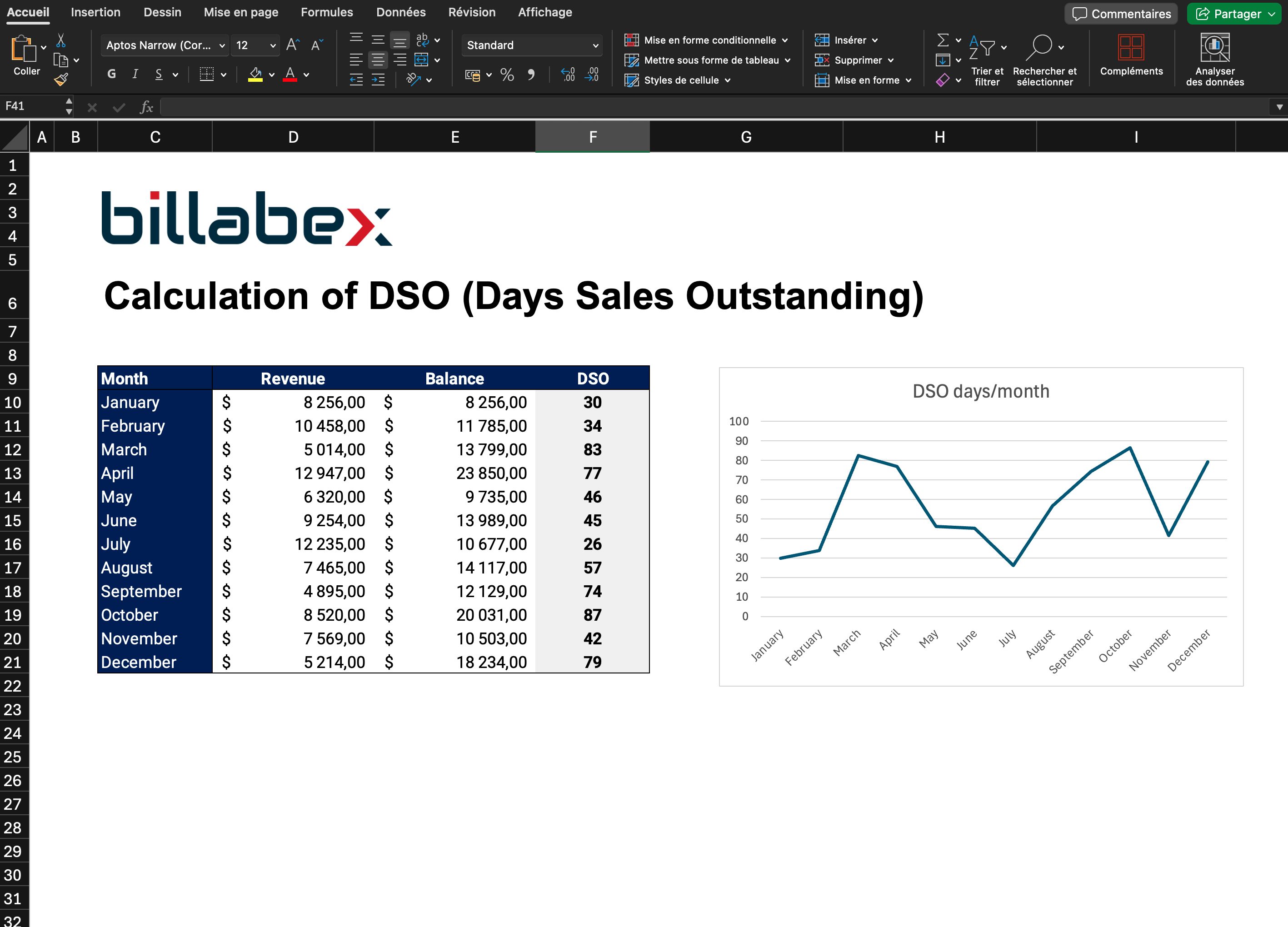
Imagine having all your data in one place, with automated formulas doing the heavy lifting. An Excel template makes tracking DSO straightforward and hassle-free.
Benefits of Using an Excel Template:
- Quick setup: Enter your sales and receivables, and let Excel handle the math.
- Visual clarity: Charts and graphs show DSO trends at a glance.
- Saves time: Focus on strategy instead of calculations.
How It Works:
- Input your monthly sales and accounts receivable balances.
- The template calculates DSO using predefined formulas.
- Review the results and analyze payment trends over time.
Let’s dive into the different methods for calculating DSO.
Methods for Calculating DSO
There’s no single “right” way to calculate DSO: it depends on your goals and available data. Here are the most common methods:
Basic Formula (Accounting Method)
This is the simplest and most widely used method.
**Formula:**DSO = (Accounts Receivable x Days in Period) / Total Sales
**Example:**If your receivables are $100,000 and your annual sales are $1,200,000:DSO = (100,000 x 365) / 1,200,000 = 30.4 days
Why Use It?
- Quick and easy for high-level analysis.
- Ideal for small businesses or a first glance at financial health.
Download Your Free Excel Template for Calculating DSO Using the Accounting Method.
Weighted Average Method
This approach accounts for each invoice’s value and payment delay.
**Formula:**DSO = Σ (Invoice Amount x Days Outstanding) / Total Invoice Amount
**Example:**You have three invoices:
- $5,000 paid in 20 days
- $3,000 paid in 35 days
- $2,000 paid in 50 days
DSO = [(5,000 x 20) + (3,000 x 35) + (2,000 x 50)] / 10,000 = 30.5 days
Why Use It?
- Provides a more detailed view of receivables.
- Highlights customer behavior patterns.
Download Your Free Excel Template for Calculating DSO Using the Weighted Average Method.
Aging Analysis
This method categorizes receivables based on their age (current, 30 days overdue, etc.).
Why Use It?
- Focuses on overdue invoices.
- Useful for identifying problem accounts.
Count-Back Method
Start with the total receivables and subtract monthly sales until the balance is zero.
Why Use It?
- Accounts for seasonal fluctuations.
- Useful for tracking monthly payment trends.
Industry Benchmarks: What’s a “Good” DSO?
DSO norms vary by industry. Here’s a quick look at averages in the U.S.:
- Retail: 30–40 days
- Construction: 60–90 days
- Technology: 45–60 days
If your DSO exceeds these averages, it’s time to dig deeper and identify bottlenecks.
How to Reduce Your DSO
Knowing your DSO is just the first step. The real goal? Reducing it. Here’s how:
- Invoice faster: Send invoices promptly to set the clock ticking sooner.
- Automate reminders: Use tools to send timely payment reminders.
- Offer incentives: Discounts for early payments can motivate customers.
- Streamline dispute resolution: Address billing issues quickly to avoid delays.
- Negotiate better terms: Shorten payment windows during contract discussions.
Conclusion: Take Control with a Simple Excel Template
Calculating DSO doesn’t have to be a headache. With an Excel template, you can simplify the process, gain valuable insights, and take actionable steps to improve your cash flow. Whether you’re a seasoned CFO or just starting in financial management, understanding and optimizing DSO is key to long-term success.
Ready to make DSO tracking effortless? Download your template today and see the impact firsthand!